


Vanilla gift cards have become very popular among online shoppers due to their convenience and versatility. In 2022, Vanilla Gift reported revenues of $73.6 million, showing its massive presence in the gift card market. Prepaid cards can be used on different online platforms, making them a versatile payment option for consumers.
However, using Vanilla gift cards online requires some understanding. First, check your card balance beforehand to ensure you have enough. Troubleshooting common issues, such as a card decline due to a zip code mismatch, will prevent transactions from falling through. You may also want to know how to register your card with a billing address to extend its usability on various online merchants.
This article provides tips on how to identify and use Vanilla gift cards effectively online. Understanding the details about the card will help you use it effectively, solve everyday problems, and make smooth purchases online.
Key Takeaways
- Vanilla Gift Cards are flexible prepaid cards for online purchases anywhere in the United States and in the District of Columbia, where Visa or Mastercard debit cards are accepted.
- When purchased, Vanilla Visa eGift Cards are activated, so they are available immediately.
- Always check the balance of your card before you order online. You must make up the purchase amount, taxes, and shipping charges. You can check your balance at balance.VanillaGift.com or by calling 1-833-322-6760.
- The best places to use Vanilla gift cards online are Amazon, eBay, Walmart, Best Buy, and Target.
How to check your Vanilla gift card balance
One must know the balance that is left in her Vanilla Gift Card to be able to conduct successful transactions. You can check the balance both online and by phone.
Advertisement
Checking your balance online
- Click the link to balance.vanillagift.com, the official website for Vanilla Gift.
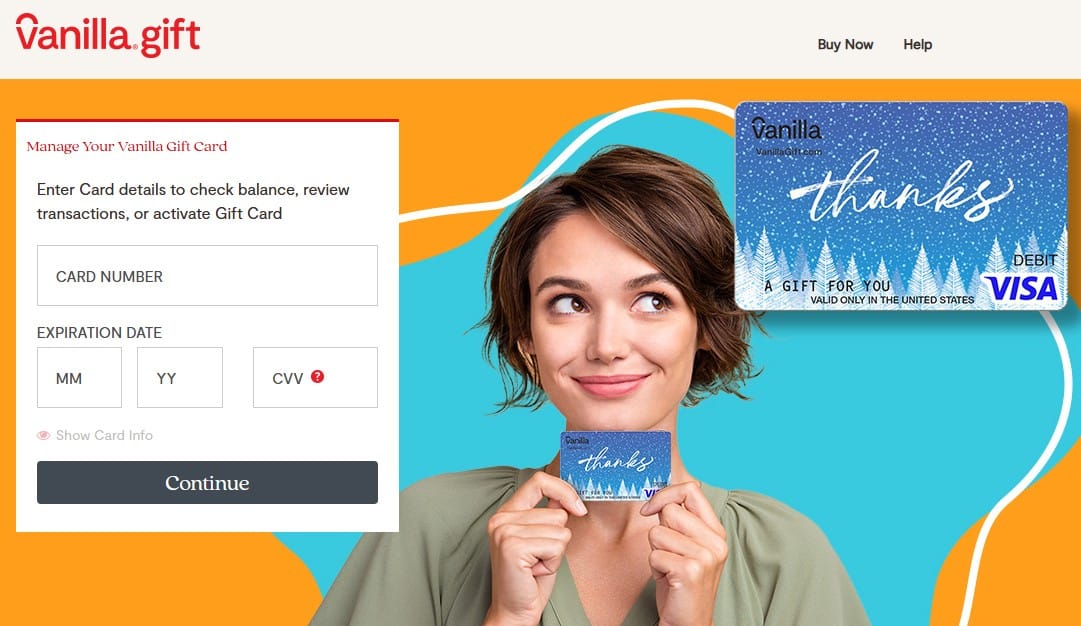
- Please enter your 16-digit card number, expiry date, and three-digit security code on the back of your card.
- Click Continue to see the current balance and list of transactions.
Checking your balance by phone
- Find the toll-free number for customer service on your Vanilla Gift Card.
- Call 1-833-322-6760 to be forwarded into the automated system.
- Simply follow the instructions to enter your card number, expiration date, and CVV.
- Listen to the system as it gives you the balance and recent transactions.
What is the best way to use Vanilla gift card?
Vanilla Gift Cards serve as prepaid gift cards for every kind of online shop, subscription payment, or single payment. Hence, they have the flexibility to perform any of their purposes. Here are tips to maximize the use of Vanilla gift cards online:
1. Activate your card
Before using your Vanilla Gift Card online, activate it. Although they do the card activation at the time of purchase, there may be a time when you want to do it later. You can do this by logging onto the Vanilla Gift Card website or dialing the telephone number provided on the gift card for customer care.
2. Check your balance
Always check your Vanilla Gift Card balance so you don’t decline at the last minute. You can check your balance online by visiting the site or calling the customer service number.
3. Use for online shopping
Vanilla Gift Cards may be used online at any store that accepts Visa or Mastercard debit cards. Simply enter your card information as you would any other debit or credit card
4. Pay for subscriptions
With your Vanilla Gift Card, you can make payments for online subscriptions, including but not limited to streaming services like Netflix, Hulu, and Spotify. You can add the card as a payment method to manage your subscriptions in your account settings.

Let the best of tech news come to you
Join 30,000 subscribers who receive Techpoint Digest, a fun week-daily 5-minute roundup of happenings in African and global tech, directly in your inbox, hours before everyone else.
5. Add to digital wallets
Some digital wallets, like PayPal, allow you to add prepaid cards as funding sources. You can link your Vanilla Gift Card to such a wallet and use it for more online transactions.
6. Use for bill payments
Some service providers accept bill payments using a Visa or Mastercard debit card. Seek to confirm that from your providers, then go ahead and pay some of your bills online using a Vanilla Gift Card.
7. Be aware of holds
Some merchants, particularly hotels and car rental services, may authorize a higher amount of the hold on your card than you spend. Holds may temporarily reduce your available balance, so have enough money in your checking account to cover such holds.
8. Monitor expiration dates
While the money on your Vanilla Gift Card does not expire, the card has an expiration date. Use the card before expiration to avoid being locked out of your money.
Why does my Vanilla gift card keep getting declined?
Delays may be the most frustrating aspect of using your Vanilla Gift Card. However, understanding common issues and their solutions will ensure smooth transactions.
1. Insufficient balance
Before initiating a purchase, ensure your card balance is adequate for the total purchase amount plus applicable taxes and fees. You can check your balance online at balance.VanillaGift.com or by calling 1-833-322-6760. For some purchases, a hold on your card may be greater than the purchase amount, so be sure your balance can support such holds.
2. Card activation status
Your card could get declined if it is not activated correctly. Contact the customer service number on the card or visit the issuing store for activation confirmation.
3. Incorrect card details
Entering the wrong card information, including the card number, expiration date, or CVV, will result in a decline. Be sure to check these details during checkout to avoid errors.
4. Merchant restrictions
Not all merchants accept the Vanilla Gift Cards; some may have restrictions. Always call the retailer first to ensure that it agrees to Visa or Mastercard prepaid cards before you make an attempted purchase.
5. Address verification issues
Some e-commerce sites may require that the billing address matches your card’s billing address. Register your card with your billing information to avoid mismatch.
6. Pending authorizations and holds
Some transactions, such as those at hotels or gas stations, may put a hold on your card for more than the purchase amount. These holds lower your available balance and may cause declines.
7. Technical issues
Some declines could also be due to system errors or server problems. If you have an issue like this, try your transaction later or call customer support.
How to use Vanilla gift cards on Amazon
Using your card as a payment on Amazon is also easily allowed. To charge your card through them, keep the following processes and facts in mind, then make whatever purchases you set on:
1. Add your Vanilla gift card to Amazon
- Log in using your Amazon account.
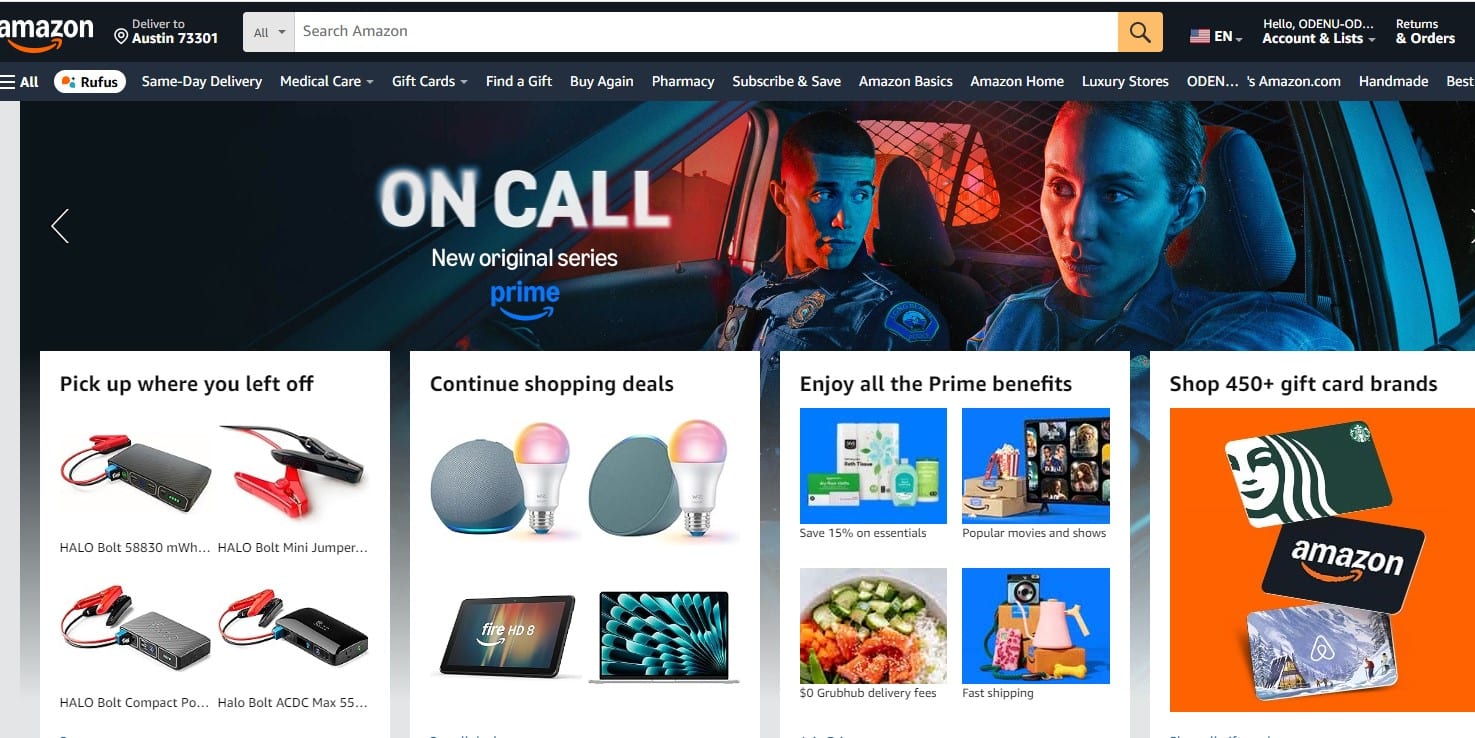
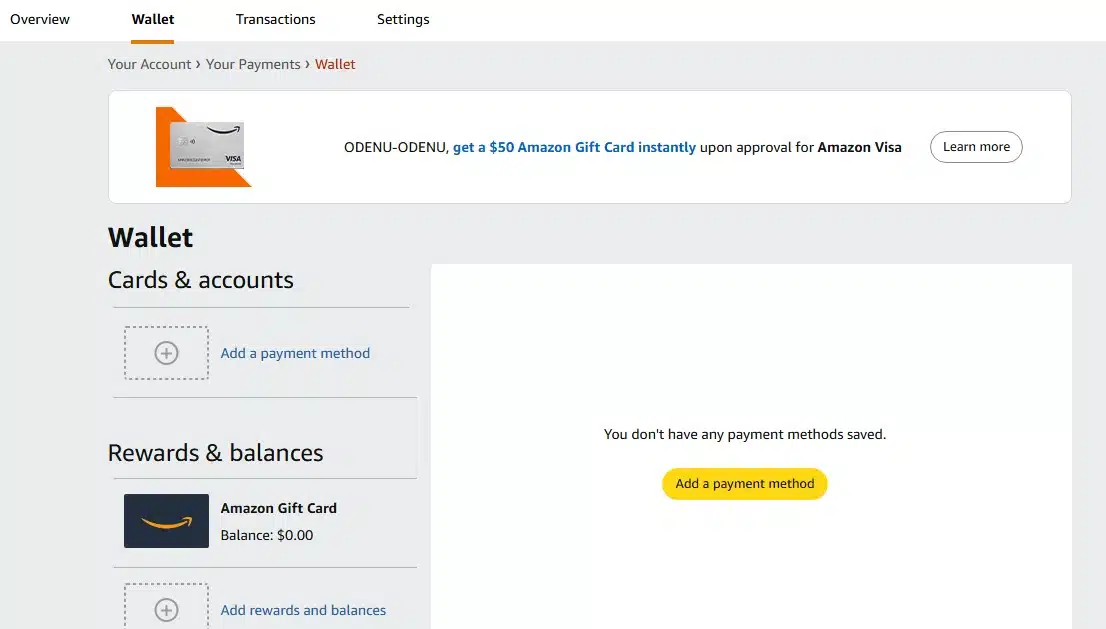
- Click Account & Lists at the top right corner of the screen and then click on Your Payments.
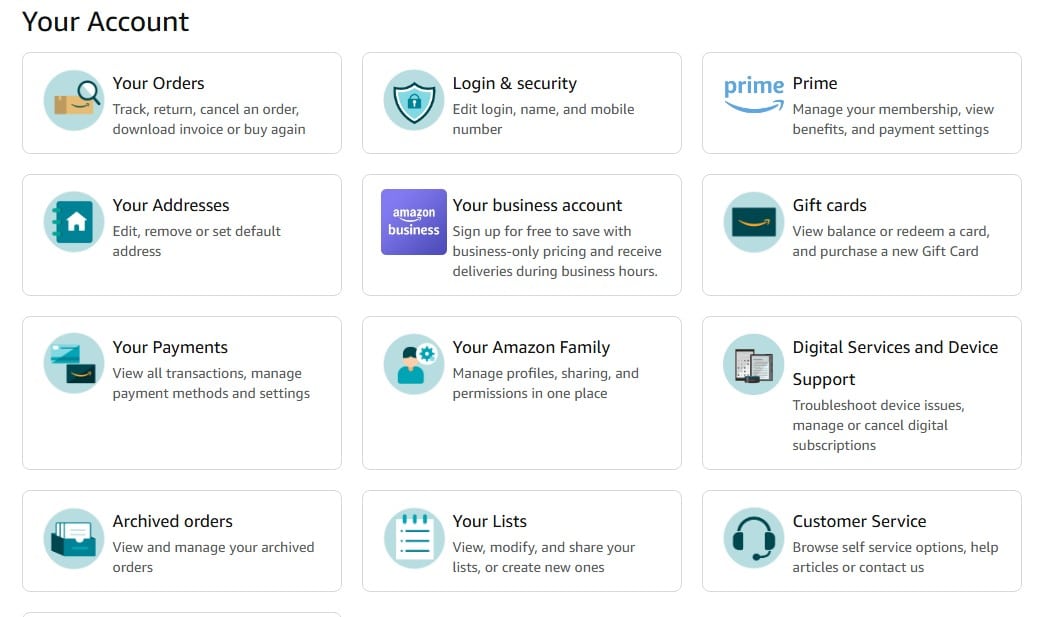
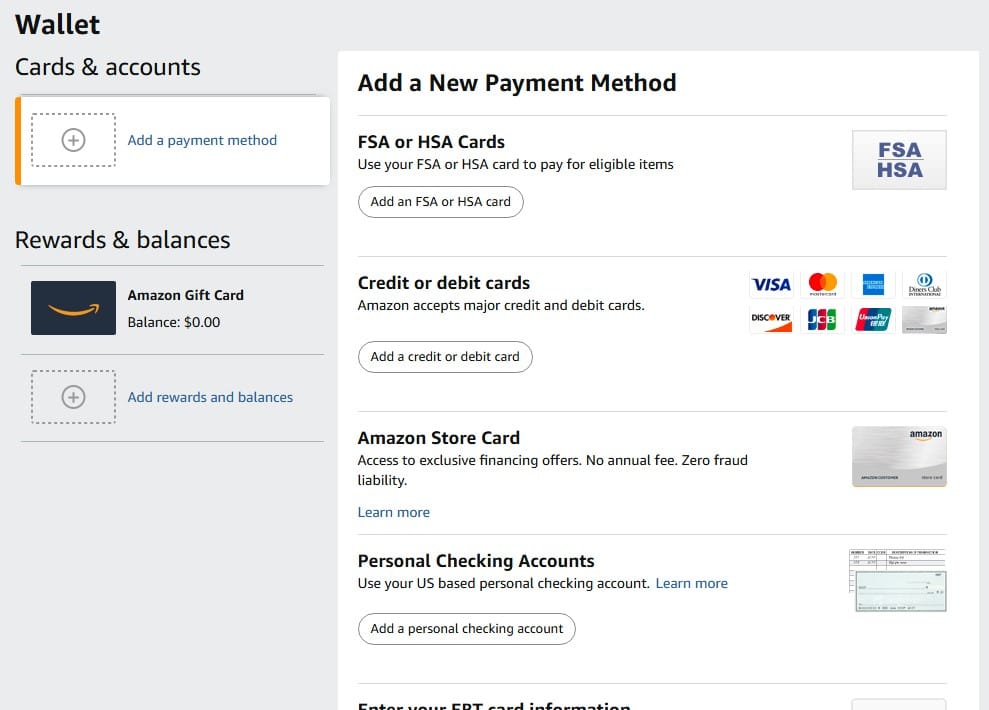
- Click Add a payment method.
- Select Add a credit or debit card.
- You must fill out your Vanilla Gift Card information, including the card number, expiration date, and CVV.
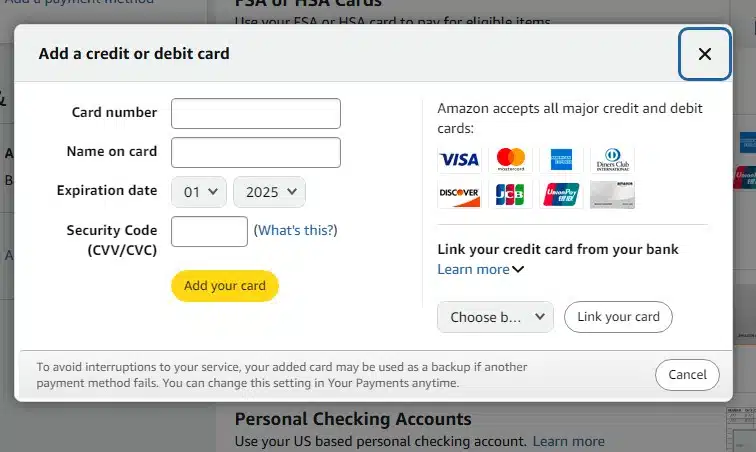
- Click Add your card to save the card to your account.
2. Make a purchase
- Add items you wish to purchase to your cart and proceed to checkout.
- Under the Payment method, you will choose the Vanilla Gift Card.
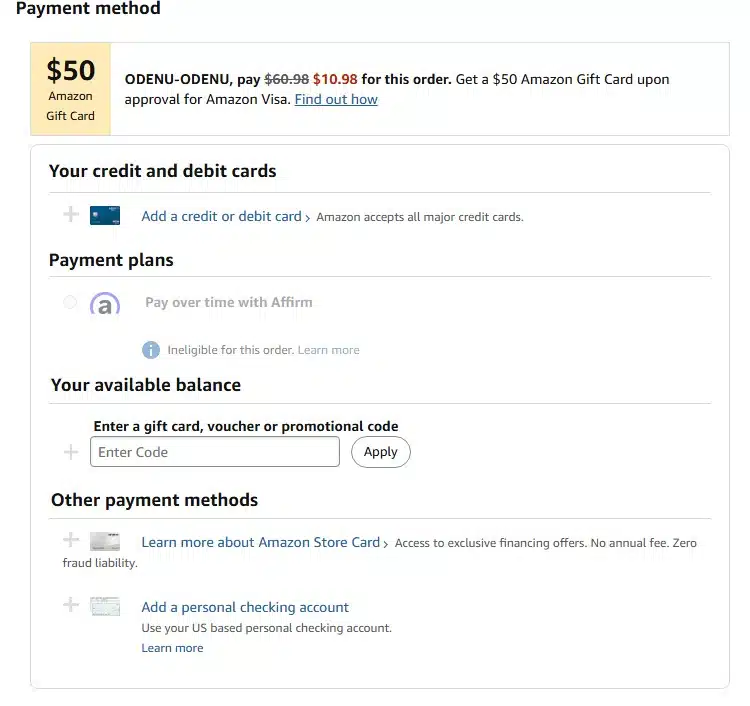
- Finish your purchase by completing the checkout process.
3. Transfer balance to Amazon gift card balance
You can, to avoid issues with insufficient funds, transfer your Vanilla Gift Card balance to your Amazon Gift Card Balance:
- Click Account & Lists at the top right corner of the screen.
- Click Gift cards.
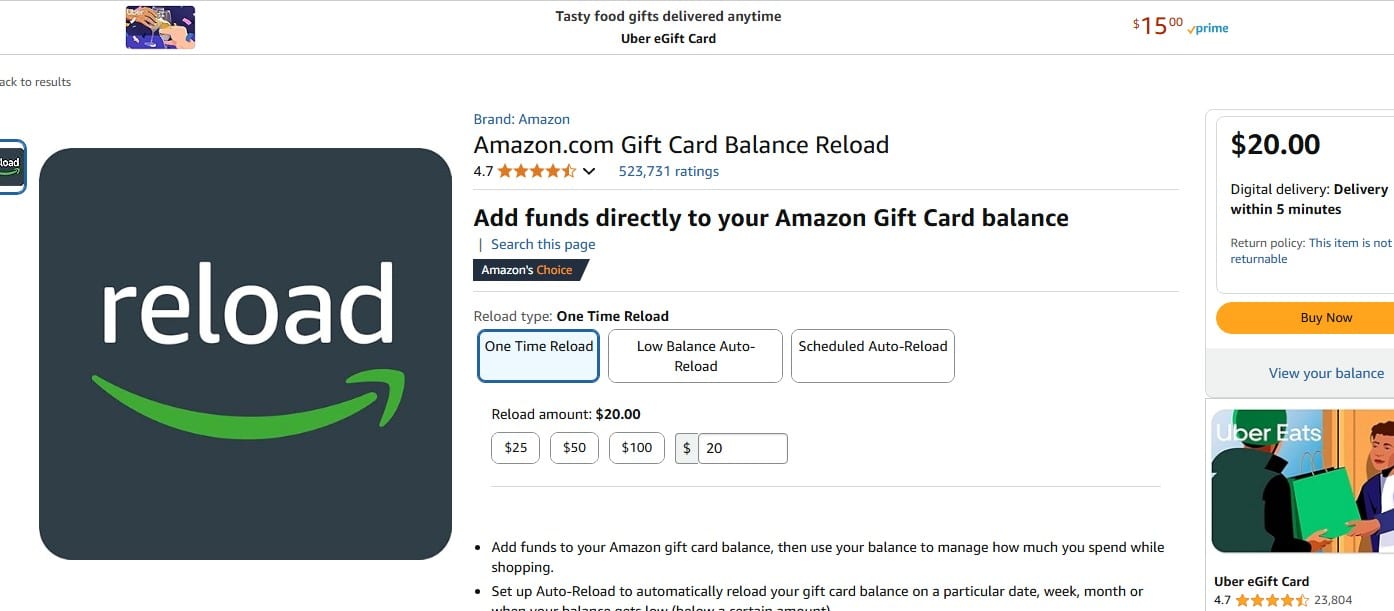
- Select the Reload your balance button.
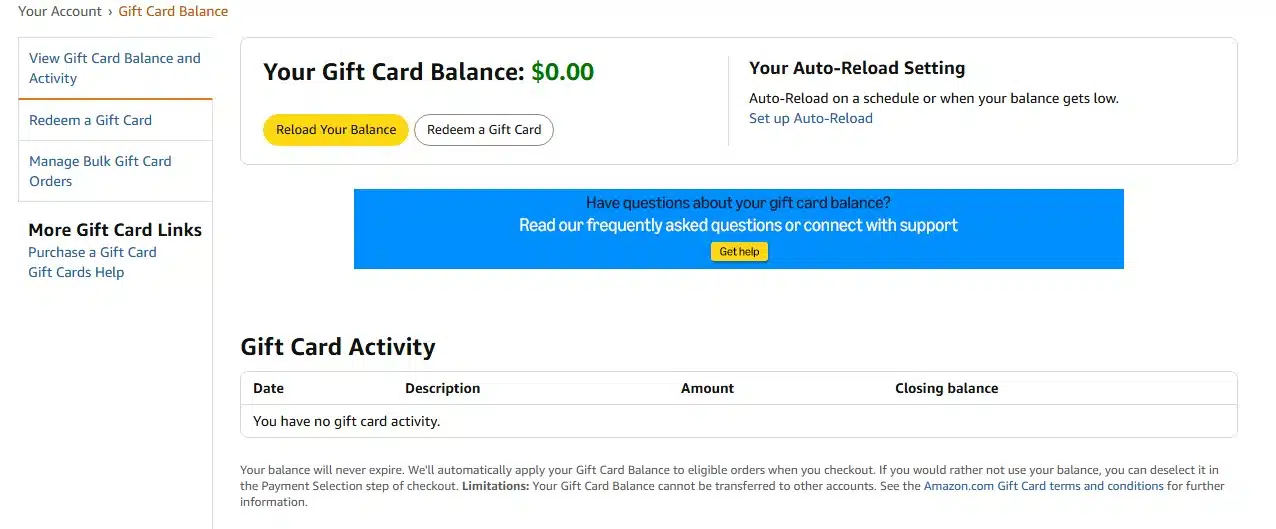
- Enter the amount available on your Vanilla Gift Card.
- When paying, click Add a credit or debit card to add the Vanilla Gift Card as a new payment option.
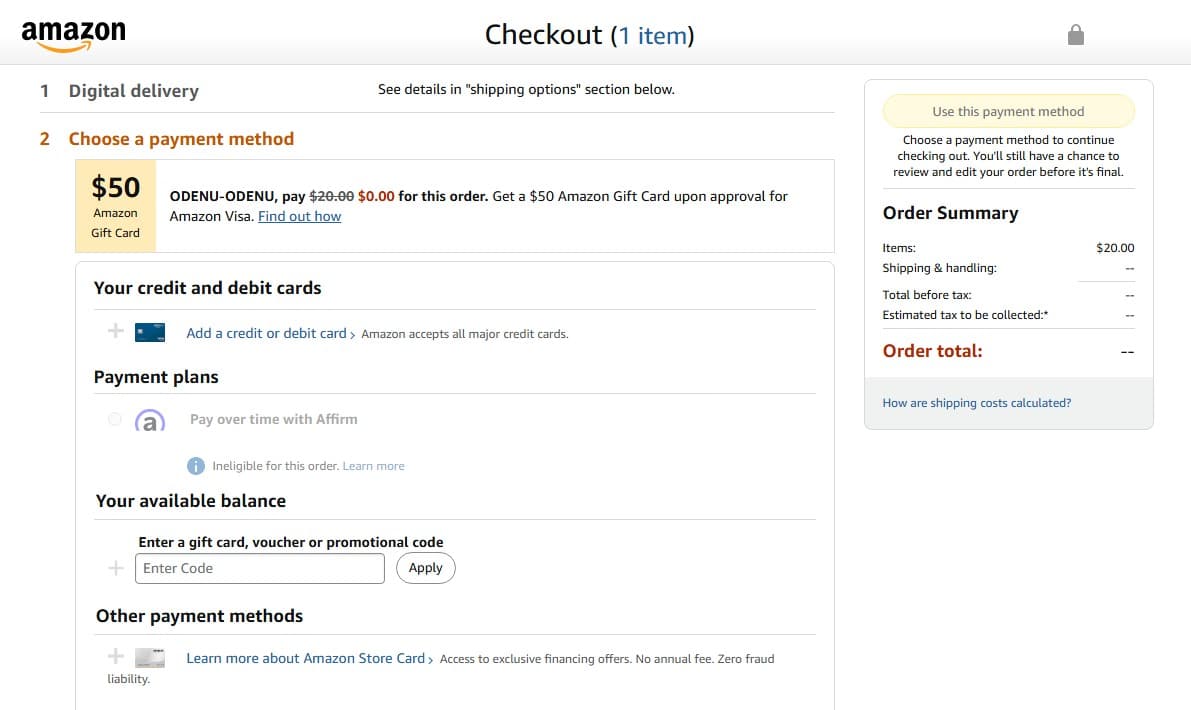
- Then, click on Use this payment method to transfer the money and finish the process.
Where can I use Vanilla gift cards online?
Vanilla Gift Cards are flexible prepaid cards for online purchases at any retailer that accepts Visa or Mastercard debit cards. They are available on various platforms and retailers and offer flexibility in how you use your balance.
Here are some popular platforms and retailers accepting Vanilla gift cards:
- Amazon
- eBay
- Walmart
- Best Buy
- Target
- Netflix
- Hulu
- Apple Music
- Spotify
- Disney+
- Uber
- Lyft
- DoorDash
- Grubhub
- Airbnb
- Expedia
- Steam
- PlayStation Store
- Xbox Store
- Etsy
FAQs about Vanilla gift cards
How do I check my Vanilla gift card balance?
You can check your Vanilla gift card balance online at balance.VanillaGift.com. Enter your card’s three-digit security code, valid-through date, and number to do so. You may also call 1-833-322-6760.
Can I use my Vanilla gift card for online purchases?
Yes. You can use your Vanilla gift card online by choosing the “Credit” or “Debit” option to pay and entering your card information as if it were any other credit or debit card.
Why is my Vanilla gift card being declined?
Your Vanilla gift card can be declined for several reasons, including low funds, merchant policies not accepting Visa debit cards and security issues. Ensure your card is activated and adequate money is on when you make a purchase.
Are Vanilla gift cards reloadable?
No. Vanilla gift cards are not reloadable. When you exhaust the balance, you can no longer use the card.
Can I use my Vanilla gift card internationally?
No. You can only use Vanilla gift cards in the United States and not abroad.
What should I do if my Vanilla gift card balance is incorrect?
If your Vanilla gift card balance is incorrect, call the customer service line at 1-833-322-6760.
Are there any fees for using Vanilla gift cards?
There are no fee aspects of using your Vanilla gift card apart from the purchase fee.
How can I combine balances from multiple Vanilla gift cards?
Combining balances from multiple Vanilla gift cards isn’t directly supported, but you can use several cards for one transaction if the merchant supports split payments.
Conclusion
Gaining value from Vanilla Gift Cards online calls for understanding the functionalities of these cards, ways to check the balance, and the kinds of problems possible. You will be able to have smooth integration of Vanilla Gift Cards within online purchases or subscription payments by following directives such as activating your card, checking its balance, and ensuring that your information is accurate during transactions. Being sensitized about general problems and how to solve them means you will surely get value from your Vanilla Gift Card.


